




深入分析Sea.js中module.exports和exports的区别与联系及常见错误总结

Sea js和Node js遵循CommonJS规范,module exports是模块最终返回的对象,exports是其引用快捷方式。为exports重新赋值会断开与module exports的连接;整体赋值module exports会覆盖exports上的属性。简单导出用exports,复杂场景用module exports。
一、官方文档解读
在探讨具体代码之前,我们先来了解Node官方文档对 exports 和 module.exports 的说明。由于SeaJs与Node.js均基于CommonJS规范,查阅官方文档是最可靠的途径。
Module.exports

The module.exports object is created by the Module system. Sometimes this is not acceptable; many want their module to be an instance of some class. To do this, assign the desired export object to module.exports. Note that assigning the desired object to exports will simply rebind the local exports variable, which is probably not what you want to do.
官方文档指出:module.exports对象由模块系统自动创建。当你期望模块表现为某个类的实例时,需要将待导出的对象赋值给module.exports。需特别留意:若直接将对象赋值给exports,仅仅是对局部变量exports的重新绑定,通常不是期望的行为。
exports
The exports variable is a vailable within a module's file-level scope, and is assigned the value of module.exports before the module is evaluated. It allows a shortcut, so that module.exports.f = ... can be written more succinctly as exports.f = .... However, be aware that like any variable, if a new value is assigned to exports, it is no longer bound to module.exports:
再看exports:exports变量在模块的文件级作用域中有效,在模块执行前已被赋值为module.exports。它提供了一种快捷方式:module.exports.f = ...可以简写为exports.f = ...。但请注意,如果给exports赋予了新值,它将不再绑定到module.exports——即断开了引用关系。
require
从require的导入逻辑来看,关键涉及两个变量(全局的module.exports和局部的exports),最终返回值始终是module.exports。下面这段简化的伪代码可以帮助你理解其机制:
function require(...) {
  var module = { exports: {} };
  ((module, exports) => {
    // 你的被引入代码
    // 默认都有 var exports = module.exports = {};
    function some_func() {};
    exports = some_func;
    // 此时exports不再挂载到module.exports,导出的是默认空对象{}
    module.exports = some_func;
    // 此时整个模块导出some_func对象,覆盖了exports上的东西
  })(module, module.exports);
  // 不管exports怎么折腾,最后返回的都是module.exports
  return module.exports;
}
二、Demo示例
理论再多也不如直接运行代码。下面几个例子将帮助你彻底搞懂这两者的区别。
示例一:1.js
console.log(exports); // {}
console.log(module.exports); // {}
console.log(exports === module.exports);  // true
console.log(exports == module.exports);   // true
/**
 Module {
   id: '.',
   exports: {},
   parent: null,
   filename: '/1.js',
   loaded: false,
   children: [],
   paths: [ '/node_modules' ]
 }
 */
console.log(module);
通过本例可以验证以下几点:
- 每个js文件创建时,内部已经存在
var exports = module.exports = {};,因此exports和module.exports最初指向同一个空对象。 module是全局内置对象,而exports是由var声明的局部变量。- 两者初始时指向同一块内存地址。
示例二:2.js、3.js
// 2.js
exports.id = 'exports的id';
exports.id2 = 'exports的id2';
exports.func = function(){
  console.log('exports的函数');
};
exports.func2 = function() {
  console.log('exports的函数2');
};
module.exports = {
  id: 'module.exports的id',
  func:function(){
    console.log('module.exports的函数');
  }
};
// 3.js
var a = require('./2.js');
// 当属性和函数在module.exports都有定义时:
console.log(a.id); // module.exports的id
console.log(a.func()); // module.exports的函数

// 当属性在module.exports没有定义,函数在module.exports有定义
console.log(a.id2); // undefined
console.log(a.func()); // module.exports的函数

// 当函数在module.exports没有定义,属性在module.exports有定义
console.log(a.id);   // module.exports的id
console.log(a.func2());  // 报错 TypeError: a.func2 is not a function
通过本示例可以明确以下几点:
module.exports就像exports的“主导者”。当module.exports以{}整体导出时,它会完全覆盖exports上挂载的属性和方法。- 如果只是分别给
module.exports和exports添加属性/方法(例如exports.id=1和module.exports.id=100),最终结果取决于执行顺序——谁在后面,谁的值生效。
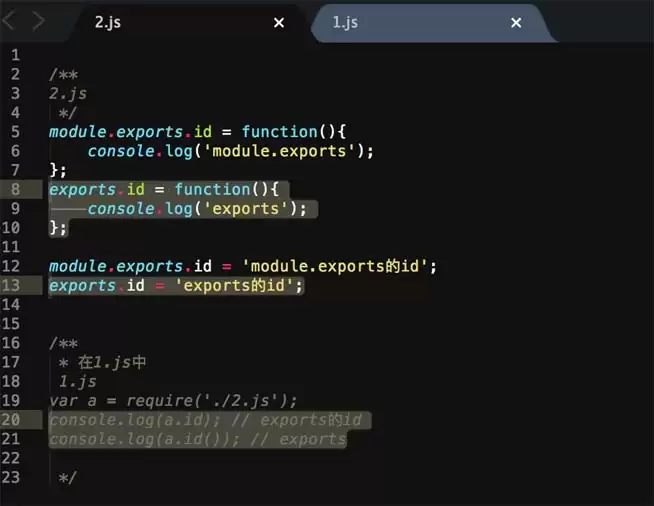
- 当
exports和module.exports同时存在时,exports上定义的属性/方法仅在module.exports中没有同名项时才能被访问到。若属性名在module.exports中缺失,获取结果为undefined;若方法名缺失,则会抛出TypeError。
示例三:4.js、5.js
展示了module.exports配合对象、原型和构造函数的典型用法。
// 4.js
var a = require('./5.js');
// 若传的是类,new一个对象
var person = new a('Kylin',20);
console.log(person.speak()); // my name is Kylin ,my age is 20

// 若不需要在构造函数时初始化参数,直接调用方法/属性
// a.speak(); // my name is kylin ,my age is 20
// 5.js
// Person类
function Person(name,age){
  this.name = name;
  this.age = age;
}
// 为类添加方法
Person.prototype.speak = function(){
  console.log('my name is '+this.name+' ,my age is '+this.age);
};

// 返回类
module.exports = Person;

// 若构造函数没有传入参数(name,age),直接传入对象
// module.exports = new Person('kylin',20);
绕了这么一大圈,最后给出简单的实践建议:
- 如果只需要导出一个单一属性或方法,直接使用
exports.挂载即可。 - 如果需要导出多个属性/方法,或涉及对象构造方法、结合原型链等复杂场景,建议直接使用
module.exports = {}整体导出。
文中部分描述可能不够精确,所涉及的要点也可能不全面。若有任何不准确之处,欢迎指正与交流。
总结
以上就是整篇文章的核心内容,希望能帮你彻底理解 exports 和 module.exports 的本质差异。实际编码时多动手测试几个例子,远比死记硬背更有效。

游乐网为非赢利性网站,所展示的游戏/软件/文章内容均来自于互联网或第三方用户上传分享,版权归原作者所有,本站不承担相应法律责任。如您发现有涉嫌抄袭侵权的内容,请联系youleyoucom@outlook.com。
 同类文章
同类文章

DCloud平台选型指南 适用场景与核心差异详解
DCloud是一个围绕跨平台开发与流应用构建的技术生态,旨在帮助前端开发者使用Web技术开发高性能移动应用。其核心产品包括集成开发环境HBuilderX和基于Vue js的uni-app框架,支持一套代码发布至iOS、Android、Web及多端小程序。相比ReactNative和Flutter,uni-app在多端覆盖和Vue技术栈学习成本上具有优势,适合

DCloud使用教程与常见问题解决方案详解
DCloud提供跨平台应用开发方案,核心为HBuilderX与uni-app框架。开发者使用Vue js语法编写代码,可编译发布至iOS、Android、Web及小程序等多端。流程涵盖项目创建、开发调试与真机预览。常见问题如设备识别、编译失败等可通过检查设置、查看日志与条件编译解决。应用完成后支持云打包生成安装包。

DCloud新手入门教程 从零开始快速掌握开发技巧
DCloud是一个基于Web技术的跨平台应用开发平台,允许开发者使用HTML5等语言编写代码,并编译为iOS、Android及小程序应用,实现“一次编写,多端发布”。开发需使用HBuilderX,基于Vue js进行页面开发,平台提供丰富组件与API,并支持插件市场扩展功能。

DCloud新手入门指南从零开始了解这个开发平台
DCloud是一个移动应用开发平台,旨在帮助前端开发者使用Web技术高效开发性能接近原生的跨平台应用。其核心产品包括HBuilderX开发环境和基于Vue js的uni-app框架,可实现一次开发、多端发布。平台通过完整工具链和插件生态降低开发门槛,适合需要快速迭代、覆盖多端的应用场景。

Zepto实战项目优化技巧与应用场景详解
Zepto js作为轻量级JavaScript库,专为移动端优化,体积仅约10KB。它支持模块化定制,可按需构建以减小体积。使用时需减少DOM操作、善用事件委托,并可混合原生API提升性能。Zepto能融入现代工程流,但需注意其与jQuery的API差异及兼容性限制,适合在移动端性能优先的场景中替代jQuery。


- 热门数据榜


 相关攻略
相关攻略
 2026-07-10 06:47
2026-07-10 06:47
2026-07-10 06:47
2026-07-10 06:47
2026-07-10 06:46
2026-07-10 06:46
2026-07-10 06:46
热门教程
2026-07-10 06:47
2026-07-10 06:47
2026-07-10 06:47
2026-07-10 06:47
2026-07-10 06:47
2026-07-10 06:46
2026-07-10 06:46
2026-07-10 06:46
热门教程
- 游戏攻略
- 安卓教程
- 苹果教程
- 电脑教程


