




Angular 7事件绑定工作方式详解

Angular 7工作方式事件绑定 在Angular应用开发中,用户交互——无论是键盘输入、鼠标点击还是鼠标悬停——都会触发一系列事件。而这些事件,恰恰是驱动应用执行特定逻辑的起点。那么,如何在Angular 7中优雅地处理它们?来看看具体的例子就清楚了。 app component html We
Angular 7工作方式事件绑定
在Angular应用开发中,用户交互——无论是键盘输入、鼠标点击还是鼠标悬停——都会触发一系列事件。而这些事件,恰恰是驱动应用执行特定逻辑的起点。那么,如何在Angular 7中优雅地处理它们?来看看具体的例子就清楚了。
app.component.html
Welcome to {{title}}.
Months :
Condition is valid.
Condition is valid Condition is invalid
先看模板文件 app.component.html。这里定义了一个按钮,然后直接通过(click)语法为其绑定了点击事件——这是Angular事件绑定的标准写法,简洁明了。
(click)="myClickFunction($event)"
$event是Angular自动传入的事件对象,里面包含了所有与本次点击相关的细节信息。
该函数在: app.component.ts 中定义
import { Component } from '@angular/core';
@Component({
   selector: 'app-root',
   templateUrl: './app.component.html',
   styleUrls: ['./app.component.css']
})
export class AppComponent {
   title="Angular 7";

   //declared array of months.
   months=["January", "February", "March", "April", "May","June", "July",
      "August", "September", "October", "November", "December"];

   isa vailable=true; //variable is set to true
   myClickFunction(event) {
      //just added console.log which will display the event details in browser on click of the button.
      alert("Button is clicked");
      console.log(event);
   }
}
对应的组件类里,定义了myClickFunction。当按钮被点击时,控制权会立即跳转到这里:先弹出一个对话框,同时在浏览器控制台打印事件对象的所有信息。
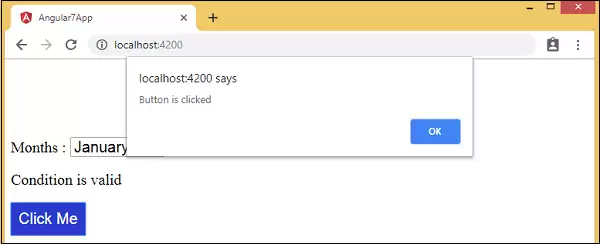
按钮的样式
为了让按钮看起来更专业,可以在add.component.css中添加一些基础样式:
button {
   background-color: #2B3BCF;
   border: none;
   color: white;
   padding: 10px 10px;
   text-align: center;
   text-decoration: none;
   display: inline-block;
   font-size: 20px;
}
这样一来,按钮就有了统一的蓝色背景、白色文字,以及适当的间距——对用户体验来说,这是基本但重要的一步。
change事件添加
除了点击事件,另一个常见场景是监听下拉列表(select)的值变化。具体做法很简单:给select元素加上(change)事件绑定就可以了。
app.component.html
Welcome to {{title}}.
Months :
Condition is valid.
Condition is valid Condition is invalid
app.component.ts 文件中声明
对应的changemonths函数需要在组件类中声明:
import { Component } from '@angular/core';
@Component({
   selector: 'app-root',
   templateUrl: './app.component.html',
   styleUrls: ['./app.component.css']
})
export class AppComponent {
   title="Angular 7";
   //declared array of months.
   months=["January", "Feburary", "March", "April", "May", "June", "July",
      "August", "September", "October", "November", "December"];
   isa vailable=true; //variable is set to true
   myClickFunction(event) {
      //just added console.log which will display the event
      details in browser on click of the button.
      alert("Button is clicked");
      console.log(event);
   }
   changemonths(event) {
      console.log("Changed month from the Dropdown");
      console.log(event);
   }
}
当用户从下拉列表中选择新的月份时,控制台就会输出Changed month from the Dropdown,同时打印事件对象信息。
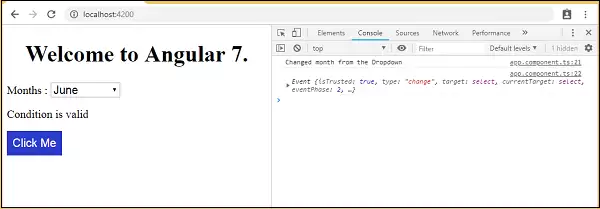
当然,在实际项目中往往不满足于只在控制台输出消息。更常见的是弹出一个对话框来提醒用户。所以,可以将changemonths函数里的日志替换为alert调用:
import { Component } from '@angular/core';
@Component({
   selector: 'app-root',
   templateUrl: './app.component.html',
   styleUrls: ['./app.component.css']
})
export class AppComponent {
   title="Angular 7";
   //declared array of months.
   months=["January", "February", "March", "April", "May", "June", "July",
      "August", "September", "October", "November", "December"];
   isa vailable=true; //variable is set to true
   myClickFunction(event) {
      //just added console.log which will display the event
      details in browser on click of the button.
      alert("Button is clicked"); console.log(event);
   }
   changemonths(event) {
      alert("Changed month from the Dropdown");
   }
}
这样一来,每当用户切换下拉列表中的月份,就会立刻看到一个对话框,上面显示着Changed month from the Dropdown。
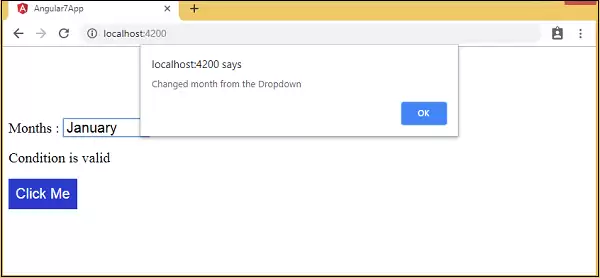
整个机制的核心思路其实很简单:通过(eventName)="handler($event)"这种声明式语法,将模板中的DOM事件直接映射到组件类的处理方法上。这既保持了模板的清晰,又让逻辑集中在TypeScript代码中——这种分离,正是Angular框架的设计哲学之一。

游乐网为非赢利性网站,所展示的游戏/软件/文章内容均来自于互联网或第三方用户上传分享,版权归原作者所有,本站不承担相应法律责任。如您发现有涉嫌抄袭侵权的内容,请联系youleyoucom@outlook.com。
 同类文章
同类文章

DCloud平台选型指南 适用场景与核心差异详解
DCloud是一个围绕跨平台开发与流应用构建的技术生态,旨在帮助前端开发者使用Web技术开发高性能移动应用。其核心产品包括集成开发环境HBuilderX和基于Vue js的uni-app框架,支持一套代码发布至iOS、Android、Web及多端小程序。相比ReactNative和Flutter,uni-app在多端覆盖和Vue技术栈学习成本上具有优势,适合

DCloud使用教程与常见问题解决方案详解
DCloud提供跨平台应用开发方案,核心为HBuilderX与uni-app框架。开发者使用Vue js语法编写代码,可编译发布至iOS、Android、Web及小程序等多端。流程涵盖项目创建、开发调试与真机预览。常见问题如设备识别、编译失败等可通过检查设置、查看日志与条件编译解决。应用完成后支持云打包生成安装包。

DCloud新手入门教程 从零开始快速掌握开发技巧
DCloud是一个基于Web技术的跨平台应用开发平台,允许开发者使用HTML5等语言编写代码,并编译为iOS、Android及小程序应用,实现“一次编写,多端发布”。开发需使用HBuilderX,基于Vue js进行页面开发,平台提供丰富组件与API,并支持插件市场扩展功能。

DCloud新手入门指南从零开始了解这个开发平台
DCloud是一个移动应用开发平台,旨在帮助前端开发者使用Web技术高效开发性能接近原生的跨平台应用。其核心产品包括HBuilderX开发环境和基于Vue js的uni-app框架,可实现一次开发、多端发布。平台通过完整工具链和插件生态降低开发门槛,适合需要快速迭代、覆盖多端的应用场景。

Zepto实战项目优化技巧与应用场景详解
Zepto js作为轻量级JavaScript库,专为移动端优化,体积仅约10KB。它支持模块化定制,可按需构建以减小体积。使用时需减少DOM操作、善用事件委托,并可混合原生API提升性能。Zepto能融入现代工程流,但需注意其与jQuery的API差异及兼容性限制,适合在移动端性能优先的场景中替代jQuery。


- 热门数据榜


 相关攻略
相关攻略
 2026-07-10 06:47
2026-07-10 06:47
2026-07-10 06:47
2026-07-10 06:47
2026-07-10 06:46
2026-07-10 06:46
2026-07-10 06:46
热门教程
2026-07-10 06:47
2026-07-10 06:47
2026-07-10 06:47
2026-07-10 06:47
2026-07-10 06:47
2026-07-10 06:46
2026-07-10 06:46
2026-07-10 06:46
热门教程
- 游戏攻略
- 安卓教程
- 苹果教程
- 电脑教程


