




AngularJS安装版本问题解析常见错误及解决方法详解

一、安装
Angular CLI 脚手架安装命令非常简单,一行代码搞定:
npm install -g @angular/cli
不过动手之前得先确认一件事:Node.js 环境版本必须是 V18 及以上。如果版本不对,项目根本跑不起来,这是很多新手容易踩的坑。
脚手架装完后,命令行会直接提示当前 Node 版本的要求——必须是 18.13.0 或大于 20.9.0 版本:
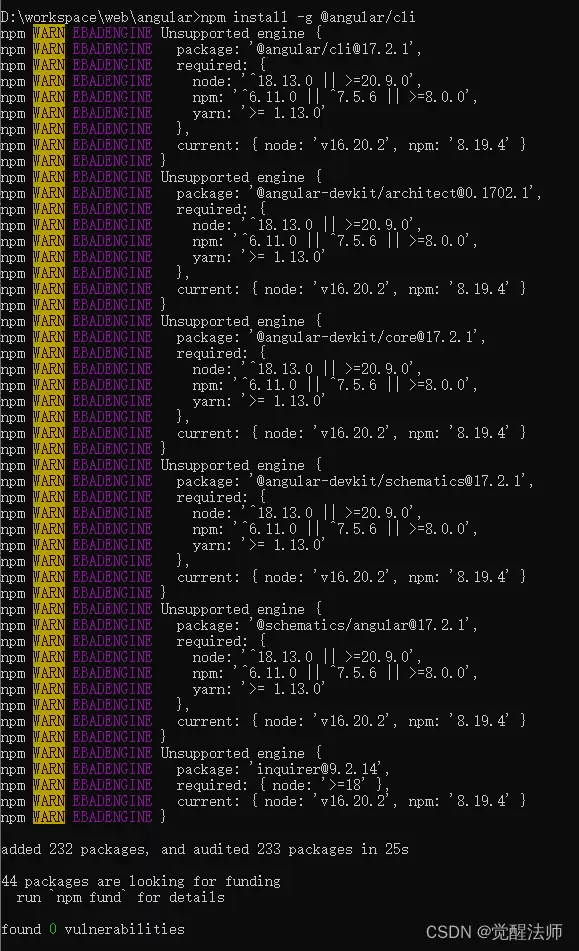
如果 Node 版本不匹配,创建项目时会立刻报错,明确告诉你 Node.js 版本必须为 v18.13,就像下面这张图展示的:

二、匹配版本
假如你手头的 Node 版本是 v16,又不想升级 Node 本身,那还有另一条路可以走——降低 @angular/cli 的版本。对应的版本列表可以在 Angular CLI 的 GitHub Releases 页面上找到。
2.1 安装命令
从 Releases 中找到适合你 Node 版本的 CLI 版本,然后安装。比如安装 16.2.6 版本:
npm install -g @angular/cli@16.2.6
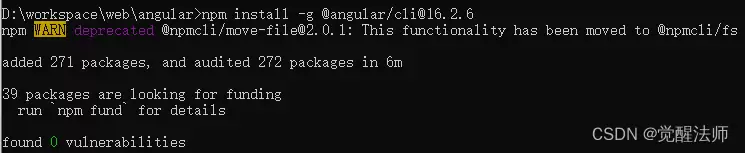
这样就不会再被版本问题阻拦了。安装成功后,命令行中不会再出现版本错误提示:
2.2 创建项目
D:workspacewebangular>ng new hello-world
? Would you like to share pseudonymous usage data about this project with the Angular Team
at Google under Google's Privacy Policy at https://policies.google.com/privacy. For more
details and how to change this setting, see https://angular.io/analytics. Yes
Thank you for sharing pseudonymous usage data. Should you change your mind, the following
command will disable this feature entirely:
    ng analytics disable --global
Global setting: enabled
Local setting: No local workspace configuration file.
Effective status: enabled
? Would you like to add Angular routing? Yes
? Which stylesheet format would you like to use? SCSS   [ https://sass-lang.com/documentation/syntax#scss
 ]
CREATE hello-world/angular.json (2899 bytes)
CREATE hello-world/package.json (1042 bytes)
CREATE hello-world/README.md (1064 bytes)
CREATE hello-world/tsconfig.json (901 bytes)
CREATE hello-world/.editorconfig (274 bytes)
CREATE hello-world/.gitignore (548 bytes)
CREATE hello-world/tsconfig.app.json (263 bytes)
CREATE hello-world/tsconfig.spec.json (273 bytes)
CREATE hello-world/.vscode/extensions.json (130 bytes)
CREATE hello-world/.vscode/launch.json (470 bytes)
CREATE hello-world/.vscode/tasks.json (938 bytes)
CREATE hello-world/src/main.ts (214 bytes)
CREATE hello-world/src/fa vicon.ico (948 bytes)
CREATE hello-world/src/index.html (296 bytes)
CREATE hello-world/src/styles.scss (80 bytes)
CREATE hello-world/src/app/app-routing.module.ts (245 bytes)
CREATE hello-world/src/app/app.module.ts (393 bytes)
CREATE hello-world/src/app/app.component.html (23115 bytes)
CREATE hello-world/src/app/app.component.spec.ts (1006 bytes)
CREATE hello-world/src/app/app.component.ts (216 bytes)
CREATE hello-world/src/app/app.component.scss (0 bytes)
CREATE hello-world/src/assets/.gitkeep (0 bytes)
√ Packages installed successfully.
warning: LF will be replaced by CRLF in .editorconfig.
The file will ha ve its original line endings in your working directory
warning: LF will be replaced by CRLF in .gitignore.
The file will ha ve its original line endings in your working directory
warning: LF will be replaced by CRLF in .vscode/extensions.json.
The file will ha ve its original line endings in your working directory
warning: LF will be replaced by CRLF in .vscode/launch.json.
The file will ha ve its original line endings in your working directory
warning: LF will be replaced by CRLF in .vscode/tasks.json.
The file will ha ve its original line endings in your working directory
warning: LF will be replaced by CRLF in README.md.
The file will ha ve its original line endings in your working directory
warning: LF will be replaced by CRLF in angular.json.
The file will ha ve its original line endings in your working directory
warning: LF will be replaced by CRLF in package-lock.json.
The file will ha ve its original line endings in your working directory
warning: LF will be replaced by CRLF in package.json.
The file will ha ve its original line endings in your working directory
warning: LF will be replaced by CRLF in src/app/app-routing.module.ts.
The file will ha ve its original line endings in your working directory
warning: LF will be replaced by CRLF in src/app/app.component.html.
The file will ha ve its original line endings in your working directory
warning: LF will be replaced by CRLF in src/app/app.component.spec.ts.
The file will ha ve its original line endings in your working directory
warning: LF will be replaced by CRLF in src/app/app.component.ts.
The file will ha ve its original line endings in your working directory
warning: LF will be replaced by CRLF in src/app/app.module.ts.
The file will ha ve its original line endings in your working directory
warning: LF will be replaced by CRLF in src/index.html.
The file will ha ve its original line endings in your working directory
warning: LF will be replaced by CRLF in src/main.ts.
The file will ha ve its original line endings in your working directory
warning: LF will be replaced by CRLF in src/styles.scss.
The file will ha ve its original line endings in your working directory
warning: LF will be replaced by CRLF in tsconfig.app.json.
The file will ha ve its original line endings in your working directory
warning: LF will be replaced by CRLF in tsconfig.json.
The file will ha ve its original line endings in your working directory
warning: LF will be replaced by CRLF in tsconfig.spec.json.
The file will ha ve its original line endings in your working directory
    Successfully initialized git.
2.3 运行项目
先进入项目目录:
D:workspacewebangular>cd hello-world
然后启动项目,命令如下:
D:workspacewebangularhello-world>ng serve --open
? Would you like to share pseudonymous usage data about this project with the Angular Team
at Google under Google's Privacy Policy at https://policies.google.com/privacy. For more
details and how to change this setting, see https://angular.io/analytics. Yes
Thank you for sharing pseudonymous usage data. Should you change your mind, the following
command will disable this feature entirely:
    ng analytics disable
Global setting: enabled
Local setting: enabled
Effective status: enabled
√ Browser application bundle generation complete.
Initial Chunk Files   | Names         |  Raw Size
vendor.js             | vendor        |   2.35 MB |
polyfills.js          | polyfills     | 333.17 kB |
styles.css, styles.js | styles        | 230.92 kB |
main.js               | main          |  48.74 kB |
runtime.js            | runtime       |   6.52 kB |
                      | Initial Total |   2.96 MB
Build at: 2024-02-26T08:05:28.353Z - Hash: daa545468f767600 - Time: 33009ms
** Angular Live Development Server is listening on localhost:4200, open your browser on http://localhost:4200/ **
√ Compiled successfully.
运行结果如下图所示,项目顺利跑起来了:
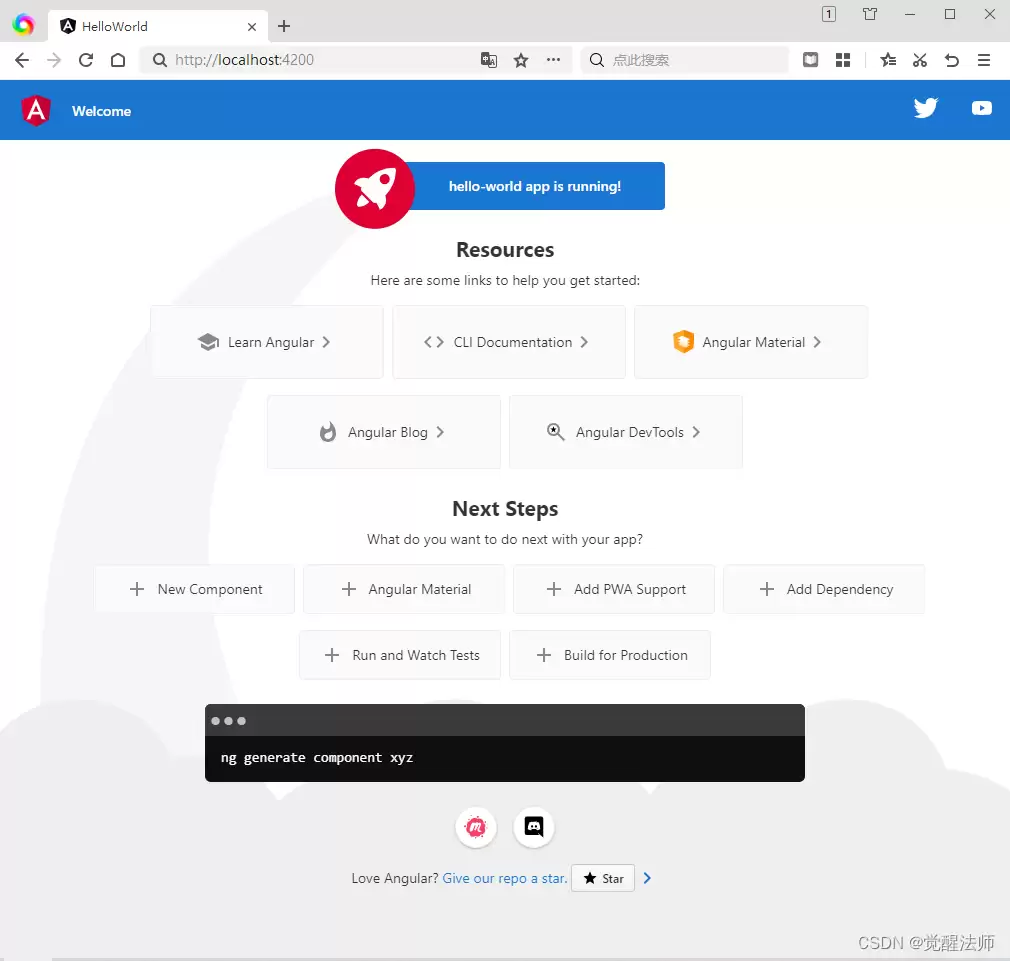
这样一来,Angular 项目的安装和版本匹配问题就解决了,接下来就可以愉快地开发了。

游乐网为非赢利性网站,所展示的游戏/软件/文章内容均来自于互联网或第三方用户上传分享,版权归原作者所有,本站不承担相应法律责任。如您发现有涉嫌抄袭侵权的内容,请联系youleyoucom@outlook.com。
 同类文章
同类文章

深入理解调用栈与异步任务的状态同步机制
调用栈仅记录同步执行流,异步回调由事件循环调度、任务队列存放,闭包维持作用域。执行时新建上下文入栈,不复用旧栈帧。调用栈不主动同步异步状态,事件循环是真正的协调者。

HTML自定义元素实现跨组件通信的完整指南
自定义元素跨组件通信需依赖CustomEvent,且bubbles和composed必须同时设为true才能穿透ShadowDOM。事件监听应挂载在document或父容器等合适节点,避免使用DOM查找或data ARIA属性替代事件通信,从而确保事件正确穿越边界,保持跨组件通信的可靠性。

JavaScript static关键字在工具库构建中的应用
在JavaScript工具库构建中,static关键字将函数或常量挂载到类名上,无需实例化即可调用,适用于无状态操作如日期格式化、字符串截断、深克隆,并统一管理配置常量与实现工厂方法,但需避免依赖实例状态。

如何避免静态初始化块异常导致应用冷启动中断
防范静态初始化失败导致应用中断,需用try-catch兜住异常并提供安全默认值;将高风险逻辑移出static块,改用延迟加载或Holder模式;显式控制初始化顺序并增强可观测性;诊断时直击ExceptionInInitializerError的根因。

虚拟DOM标签级diff比对优化过程详解
虚拟DOMdiff以节点为单位,按层级同标签优先判断复用,通过key精准识别节点身份,配合细粒度属性更新及短路优化,避免全量递归比较,只更新变化的节点,跳过冗余计算,将时间复杂度从O(n³)降至接近O(n),从而大幅提升渲染性能。


- 日榜
- 周榜
- 月榜


 相关攻略
相关攻略
 2026-07-08 06:57
2026-07-08 06:56
2026-07-08 06:56
2026-07-08 06:56
2026-07-08 06:56
2026-07-08 06:56
2026-07-08 06:56
2026-07-08 06:55
热门教程
2026-07-08 06:57
2026-07-08 06:56
2026-07-08 06:56
2026-07-08 06:56
2026-07-08 06:56
2026-07-08 06:56
2026-07-08 06:56
2026-07-08 06:55
热门教程
- 游戏攻略
- 安卓教程
- 苹果教程
- 电脑教程


 热门话题
热门话题
