




SpringBoot如何查看与SpringCloud的对应版本

1、访问Spring官方网站 要获取最权威的版本对应信息,最直接的办法就是访问Spring的官方项目网站。通常,你只需要在页面上找到并点击查看版本的链接即可。 2、解读返回的JSON元数据 访问后,网站会返回一份结构清晰的JSON数据,里面包含了构建信息、Git提交记录,以及我们最关心的——各个组件
1、访问Spring官方网站
要获取最权威的版本对应信息,最直接的办法就是访问Spring的官方项目网站。通常,你只需要在页面上找到并点击查看版本的链接即可。
2、解读返回的JSON元数据
访问后,网站会返回一份结构清晰的JSON数据,里面包含了构建信息、Git提交记录,以及我们最关心的——各个组件与Spring Boot版本的对应关系。这份数据是动态生成的,可以说是最准确的参考依据。
{
	"git": {
		"branch": "f108974763241b29b1ccca808fb51b845aef6872",
		"commit": {
			"id": "f108974",
			"time": "2022-11-18T17:14:23Z"
		}
	},
	"build": {
		"version": "0.0.1-SNAPSHOT",
		"artifact": "start-site",
		"versions": {
			"spring-boot": "2.7.5",
			"initializr": "0.20.0-SNAPSHOT"
		},
		"name": "start.spring.io website",
		"time": "2022-11-18T17:26:09.482Z",
		"group": "io.spring.start"
	},
	"bom-ranges": {
		"codecentric-spring-boot-admin": {
			"2.4.3": "Spring Boot >=2.3.0.M1 and <2.5.0-M1",
			"2.5.6": "Spring Boot >=2.5.0.M1 and <2.6.0-M1",
			"2.6.8": "Spring Boot >=2.6.0.M1 and <2.7.0-M1",
			"2.7.4": "Spring Boot >=2.7.0.M1 and <3.0.0-M1",
			"3.0.0-M4": "Spring Boot >=3.0.0-M1 and <3.1.0-M1"
		},
		"solace-spring-boot": {
			"1.1.0": "Spring Boot >=2.3.0.M1 and <2.6.0-M1",
			"1.2.2": "Spring Boot >=2.6.0.M1 and <3.0.0-M1"
		},
		"solace-spring-cloud": {
			"1.1.1": "Spring Boot >=2.3.0.M1 and <2.4.0-M1",
			"2.1.0": "Spring Boot >=2.4.0.M1 and <2.6.0-M1",
			"2.3.2": "Spring Boot >=2.6.0.M1 and <3.0.0-M1"
		},
		"spring-cloud": {
			"Hoxton.SR12": "Spring Boot >=2.2.0.RELEASE and <2.4.0.M1",
			"2020.0.6": "Spring Boot >=2.4.0.M1 and <2.6.0-M1",
			"2021.0.0-M1": "Spring Boot >=2.6.0-M1 and <2.6.0-M3",
			"2021.0.0-M3": "Spring Boot >=2.6.0-M3 and <2.6.0-RC1",
			"2021.0.0-RC1": "Spring Boot >=2.6.0-RC1 and <2.6.1",
			"2021.0.5": "Spring Boot >=2.6.1 and <3.0.0-M1",
			"2022.0.0-M1": "Spring Boot >=3.0.0-M1 and <3.0.0-M2",
			"2022.0.0-M2": "Spring Boot >=3.0.0-M2 and <3.0.0-M3",
			"2022.0.0-M3": "Spring Boot >=3.0.0-M3 and <3.0.0-M4",
			"2022.0.0-M4": "Spring Boot >=3.0.0-M4 and <3.0.0-M5",
			"2022.0.0-M5": "Spring Boot >=3.0.0-M5 and <3.0.0-RC1",
			"2022.0.0-RC1": "Spring Boot >=3.0.0-RC1 and <3.1.0-M1"
		},
		"spring-cloud-azure": {
			"4.3.0": "Spring Boot >=2.5.0.M1 and <2.7.0-M1",
			"4.4.1": "Spring Boot >=2.7.0-M1 and <3.0.0-M1",
			"6.0.0-beta.3": "Spring Boot >=3.0.0-M1 and <3.1.0-M1"
		},
		"spring-cloud-gcp": {
			"2.0.11": "Spring Boot >=2.4.0-M1 and <2.6.0-M1",
			"3.4.0": "Spring Boot >=2.6.0-M1 and <3.0.0-M1"
		},
		"spring-cloud-services": {
			"2.3.0.RELEASE": "Spring Boot >=2.3.0.RELEASE and <2.4.0-M1",
			"2.4.1": "Spring Boot >=2.4.0-M1 and <2.5.0-M1",
			"3.3.0": "Spring Boot >=2.5.0-M1 and <2.6.0-M1",
			"3.4.0": "Spring Boot >=2.6.0-M1 and <2.7.0-M1",
			"3.5.0": "Spring Boot >=2.7.0-M1 and <3.0.0-M1"
		},
		"spring-shell": {
			"2.1.3": "Spring Boot >=2.7.0 and <3.0.0-M1",
			"3.0.0-M2": "Spring Boot >=3.0.0-M1 and <3.1.0-M1"
		},
		"vaadin": {
			"14.9.1": "Spring Boot >=2.1.0.RELEASE and <2.6.0-M1",
			"23.2.7": "Spring Boot >=2.6.0-M1 and <2.8.0-M1"
		},
		"wa vefront": {
			"2.0.2": "Spring Boot >=2.1.0.RELEASE and <2.4.0-M1",
			"2.1.1": "Spring Boot >=2.4.0-M1 and <2.5.0-M1",
			"2.2.2": "Spring Boot >=2.5.0-M1 and <2.7.0-M1",
			"2.3.1": "Spring Boot >=2.7.0-M1 and <3.0.0-M1"
		}
	},
	"dependency-ranges": {
		"native": {
			"0.9.0": "Spring Boot >=2.4.3 and <2.4.4",
			"0.9.1": "Spring Boot >=2.4.4 and <2.4.5",
			"0.9.2": "Spring Boot >=2.4.5 and <2.5.0-M1",
			"0.10.0": "Spring Boot >=2.5.0-M1 and <2.5.2",
			"0.10.1": "Spring Boot >=2.5.2 and <2.5.3",
			"0.10.2": "Spring Boot >=2.5.3 and <2.5.4",
			"0.10.3": "Spring Boot >=2.5.4 and <2.5.5",
			"0.10.4": "Spring Boot >=2.5.5 and <2.5.6",
			"0.10.5": "Spring Boot >=2.5.6 and <2.5.9",
			"0.10.6": "Spring Boot >=2.5.9 and <2.6.0-M1",
			"0.11.0-M1": "Spring Boot >=2.6.0-M1 and <2.6.0-RC1",
			"0.11.0-M2": "Spring Boot >=2.6.0-RC1 and <2.6.0",
			"0.11.0-RC1": "Spring Boot >=2.6.0 and <2.6.1",
			"0.11.0": "Spring Boot >=2.6.1 and <2.6.2",
			"0.11.1": "Spring Boot >=2.6.2 and <2.6.3",
			"0.11.2": "Spring Boot >=2.6.3 and <2.6.4",
			"0.11.3": "Spring Boot >=2.6.4 and <2.6.6",
			"0.11.5": "Spring Boot >=2.6.6 and <2.7.0-M1",
			"0.12.0": "Spring Boot >=2.7.0-M1 and <2.7.1",
			"0.12.1": "Spring Boot >=2.7.1 and <3.0.0-M1"
		},
		"okta": {
			"1.4.0": "Spring Boot >=2.2.0.RELEASE and <2.4.0-M1",
			"1.5.1": "Spring Boot >=2.4.0-M1 and <2.4.1",
			"2.0.1": "Spring Boot >=2.4.1 and <2.5.0-M1",
			"2.1.6": "Spring Boot >=2.5.0-M1 and <3.0.0-M1"
		},
		"mybatis": {
			"2.1.4": "Spring Boot >=2.1.0.RELEASE and <2.5.0-M1",
			"2.2.2": "Spring Boot >=2.5.0-M1"
		},
		"camel": {
			"3.5.0": "Spring Boot >=2.3.0.M1 and <2.4.0-M1",
			"3.10.0": "Spring Boot >=2.4.0-M1 and <2.5.0-M1",
			"3.13.0": "Spring Boot >=2.5.0.M1 and <2.6.0-M1",
			"3.17.0": "Spring Boot >=2.6.0.M1 and <2.7.0-M1",
			"3.19.0": "Spring Boot >=2.7.0.M1 and <3.0.0-M1"
		},
		"picocli": {
			"4.6.3": "Spring Boot >=2.4.0.RELEASE and <3.0.0-M1"
		},
		"open-service-broker": {
			"3.2.0": "Spring Boot >=2.3.0.M1 and <2.4.0-M1",
			"3.3.1": "Spring Boot >=2.4.0-M1 and <2.5.0-M1",
			"3.4.1": "Spring Boot >=2.5.0-M1 and <2.6.0-M1",
			"3.5.0": "Spring Boot >=2.6.0-M1 and <2.7.0-M1"
		}
	}
}
3、如何解读具体的对应关系
关键在于看懂JSON结构。以最常用的 `spring-cloud` 为例,我们来看具体怎么解读:
"spring-cloud": {
			"Hoxton.SR12": "Spring Boot >=2.2.0.RELEASE and <2.4.0.M1",
			"2020.0.6": "Spring Boot >=2.4.0.M1 and <2.6.0-M1",
			"2021.0.0-M1": "Spring Boot >=2.6.0-M1 and <2.6.0-M3",
			"2021.0.0-M3": "Spring Boot >=2.6.0-M3 and <2.6.0-RC1",
			"2021.0.0-RC1": "Spring Boot >=2.6.0-RC1 and <2.6.1",
			"2021.0.5": "Spring Boot >=2.6.1 and <3.0.0-M1",
			"2022.0.0-M1": "Spring Boot >=3.0.0-M1 and <3.0.0-M2",
			"2022.0.0-M2": "Spring Boot >=3.0.0-M2 and <3.0.0-M3",
			"2022.0.0-M3": "Spring Boot >=3.0.0-M3 and <3.0.0-M4",
			"2022.0.0-M4": "Spring Boot >=3.0.0-M4 and <3.0.0-M5",
			"2022.0.0-M5": "Spring Boot >=3.0.0-M5 and <3.0.0-RC1",
			"2022.0.0-RC1": "Spring Boot >=3.0.0-RC1 and <3.1.0-M1"
		}
这里能看出:
“Hoxton.SR12": "Spring Boot >=2.2.0.RELEASE and <2.4.0.M1”
这行数据的含义非常明确:如果你希望使用 Spring Cloud 的 `Hoxton.SR12` 版本,那么你的 Spring Boot 版本必须满足 **大于等于 2.2.0.RELEASE 且小于 2.4.0.M1** 这个范围。其他版本的对应关系,依此类推即可。
4、第二种查询办法
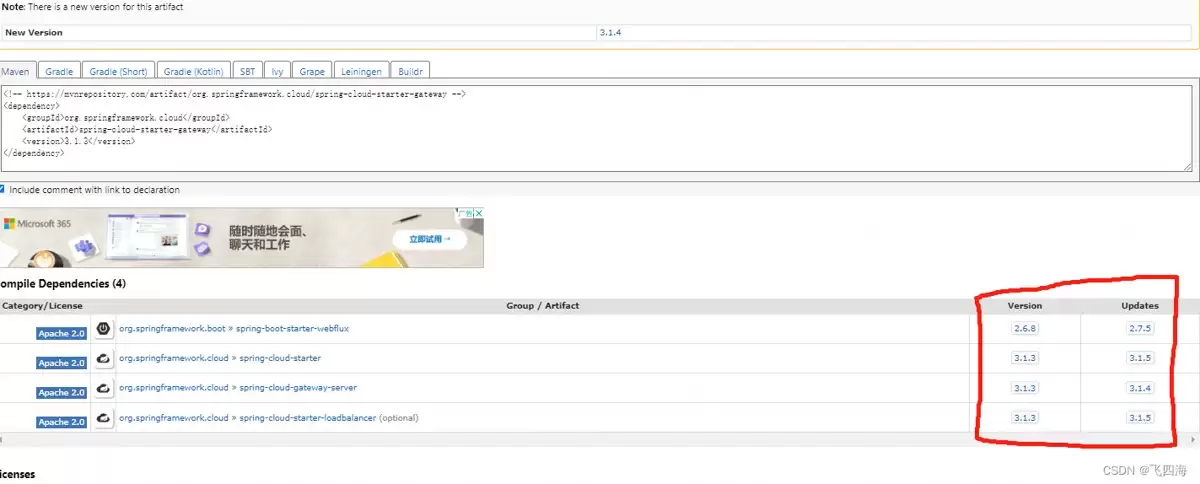
查看Ma ven中央仓库:除了官方JSON,还有一个更直观的途径,那就是直接访问Ma ven仓库。比如,打开 https://mvnrepository.com/artifact/org.springframework.cloud/,在对应组件的版本页面上,通常也会明确列出其兼容的Spring Boot版本范围。
总结
总的来说,掌握版本对应关系是保证Spring技术栈项目稳定性的第一步。上面介绍的两种方法——查询官方元数据和查看Ma ven仓库——都是经过验证的可靠途径,希望能为大家在技术选型和依赖管理时提供一个清晰的参考。

游乐网为非赢利性网站,所展示的游戏/软件/文章内容均来自于互联网或第三方用户上传分享,版权归原作者所有,本站不承担相应法律责任。如您发现有涉嫌抄袭侵权的内容,请联系youleyoucom@outlook.com。
 同类文章
同类文章

IDEA中SpringBoot项目热部署实现指南
Springboot项目在IDEA中实现热部署需依次完成:开启自动编译(静态与动态编译)、启用热部署策略、引入spring-boot-devtools依赖、关闭浏览器缓存,最后启动测试即可生效,省去手动重启时间,大幅提升开发效率。

Java实现Excel转JSON的代码详解
使用Java结合FreeSpire XLS库可自动将Excel转为JSON,通过读取工作表并映射为键值对,高效支持数据迁移、报表导出与系统对接,大幅提升效率并消除手动录入错误。

Golang高效布谷鸟过滤器多字符集字符串过滤
布谷鸟过滤器支持删除操作,通过指纹截断与双哈希定位实现多字符集高效过滤。指纹截断需采用fnv64a或xxhash快速哈希并取低8位,桶索引使用独立双哈希避免假阳性。并发安全需以固定数组配合sync atomic实现。

Java使用Poi-tl按Word模板生成动态表格
Poi-tl是Word导出工具,文档周全,支持多级合并表头生成。通过{{text}}、{{?var}}、{{ table}}标签处理模板,传入TableRenderData对象即可动态渲染表格。示例展示用户信息表格生成,并提供工具类消除表格首行缩进,确保格式正确。

Go语言微服务集成Swagger生成交互式API文档完整教程
在Go微服务中集成Swagger常见四大问题:swaginit初始化失败需确保存在packagemain及注释;SwaggerUI加载失败因路由映射错误或未导入docs;@Param注解必须严格遵循格式;部署后接口文档显示localhost因硬编码host,应删除或通过环境变量动态注入。


- 热门数据榜


 相关攻略
相关攻略
 2026-07-11 06:47
2026-07-11 06:47
2026-07-11 06:47
2026-07-11 06:47
2026-07-11 06:46
2026-07-11 06:46
2026-07-11 06:46
热门教程
2026-07-11 06:47
2026-07-11 06:47
2026-07-11 06:47
2026-07-11 06:47
2026-07-11 06:47
2026-07-11 06:46
2026-07-11 06:46
2026-07-11 06:46
热门教程
- 游戏攻略
- 安卓教程
- 苹果教程
- 电脑教程


