




LangGraph构建RAG智能体从入门到精通手把手实战教程

使用LangGraph构建RAGAgent,通过文档预处理、检索工具创建、查询生成、文档评分、问题重写、答案生成及图组装,实现检索增强生成。该工作流将外部知识库与语言模型结合,提升答案的准确性与可信度。
深入解析 LangGraph 在 RAG Agent 中的实践:实现知识检索与内容生成的精准融合
RAG(检索增强生成)通过接入外部知识库,将动态信息检索与大模型生成能力巧妙结合,使大语言模型(LLM)既能保持“博学多识”,又能确保“有据可依”。其核心流程可概括为:
1️⃣ 检索 → 从知识库中高效提取相关文档片段;
2️⃣ 增强 → 将检索结果融入提示词(Prompt),辅助模型理解上下文;
3️⃣ 生成 → 输出兼具准确性与可溯源性的优质回答。
本篇LangGraph RAG Agent教程将手把手带你使用 LangGraph 搭建一个功能完备的 RAG Agent,内容涵盖文档预处理、检索工具构建、查询生成、文档相关性评分、问题重写、答案生成以及最终的工作流图组装。跟随一步步的代码实战,你将清晰掌握 RAG Agent 的运行机制与落地方法。
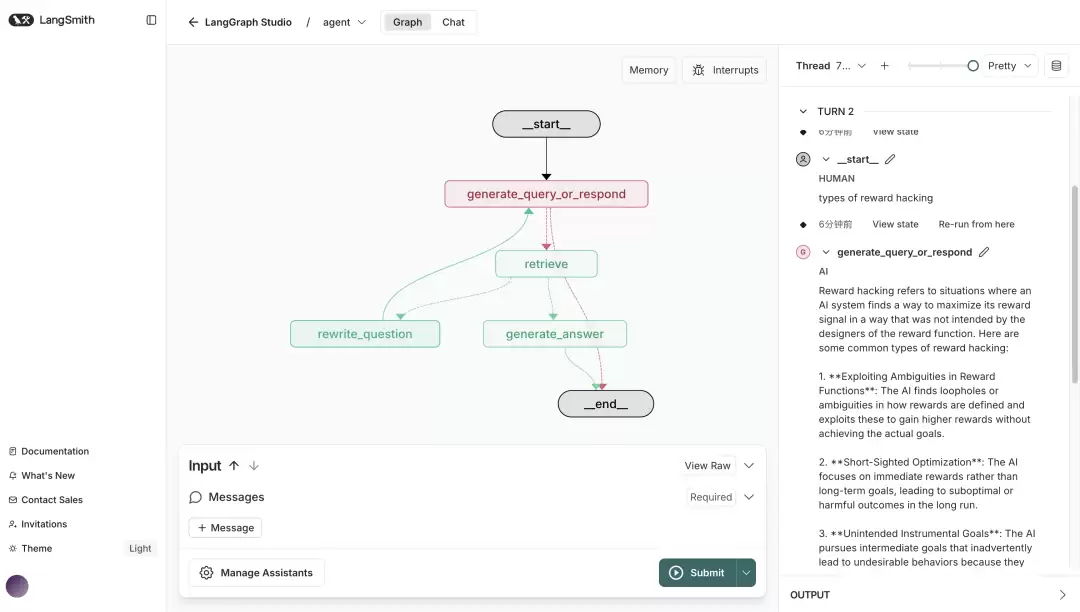
核心内容总览
- 文档预处理:从网络加载目标文档并完成智能切分
- 检索工具搭建:将文档向量化并构建高效检索器
- 查询生成:借助 LLM 判断是否需要检索,并自动调用工具
- 文档评分:评估检索结果与用户问题的相关度,决定下一步动作
- 问题重写:当文档不相关时,优化并重构用户原始提问
- 答案生成:基于已筛选的相关文档,生成最终回复
- Graph 组装:将上述节点串联为可执行的 LangGraph 工作流
1. 文档预处理流程
借助 WebBaseLoader 工具加载指定 Web 资源,读取并解析文档正文。本教程选取 Lilian Weng 的三篇博客文章作为示例数据源。
from langchain_community.document_loaders import WebBaseLoader

urls = [
    "https://lilianweng.github.io/posts/2024-11-28-reward-hacking/",
    "https://lilianweng.github.io/posts/2024-07-07-hallucination/",
    "https://lilianweng.github.io/posts/2024-04-12-diffusion-video/",
]

docs = [WebBaseLoader(url).load() for url in urls]
温馨提示: 若网络请求出现异常,请检查 URL 链接是否有效,或改用本地文件加载方式作为替代方案。
2. 检索工具构建详解
对已加载的文档数据进行切分处理,将长文本分割为适当大小的文本块(chunk),以便后续检索与向量化操作更加高效。
from langchain_text_splitters import RecursiveCharacterTextSplitter

docs_list = [item for sublist in docs for item in sublist]

text_splitter = RecursiveCharacterTextSplitter.from_tiktoken_encoder(
    chunk_size=100, chunk_overlap=50
)
doc_splits = text_splitter.split_documents(docs_list)
选用阿里 千问(QianWen) 提供的 embedding 模型(DashScopeEmbeddings)将文档内容转化为向量表示,并存入内存向量数据库 InMemoryVectorStore 中。
from langchain_core.vectorstores import InMemoryVectorStore
from langchain_community.embeddings import DashScopeEmbeddings

vectorstore = InMemoryVectorStore.from_documents(
    documents=doc_splits, embedding=DashScopeEmbeddings(model="text-embedding-v3")
)
retriever = vectorstore.as_retriever()
接下来,将 retriever 封装为 LangChain 工具,方便大模型直接调用检索能力。
from langchain.tools.retriever import create_retriever_tool

retriever_tool = create_retriever_tool(
    retriever,
    "retrieve_blog_posts",
    "Search and return information about Lilian Weng blog posts.",
)
注意事项: chunk_size(块大小)和 chunk_overlap(块重叠量)可根据文档长度与业务需求灵活调整。块设置过小易丢失上下文,过大则可能降低检索的精准度。
3. 智能查询生成策略
采用阿里 千问(QianWen) 模型作为底层 LLM,构建 generate_query_or_respond 节点。该节点负责接收用户消息,智能判断是否需要调用检索工具获取外部知识,或直接回复用户提问。
from langgraph.graph import MessagesState

response_model = ChatTongyi(model="qwen-plus")


def generate_query_or_respond(state: MessagesState):
    """Call the model to generate a response based on the current state. Given
    the question, it will decide to retrieve using the retriever tool, or simply respond to the user.
    """
    response = (
        response_model.bind_tools([retriever_tool]).invoke(state["messages"])
    )
    return {"messages": [response]}
常见疑问: 为何模型有时不调用检索工具?答:请务必确认 bind_tools 已正确绑定,且所选模型支持工具调用功能(如 Qwen-Plus 具备此能力)。此外,用户提问若未涉及文档内容,模型也可能选择直接作答。
4. 文档相关性评分机制
定义 grade_documents 节点,借助结构化输出模型评估检索到的文档与用户问题之间的匹配程度。若判断为相关(返回 "yes"),则流转至 generate_answer 节点;否则进入 rewrite_question 节点进行问题优化。
from pydantic import BaseModel, Field
from typing import Literal

GRADE_PROMPT = (
    "You are a grader assessing relevance of a retrieved document to a user question. \n "
    "Here is the retrieved document: \n\n {context} \n\n"
    "Here is the user question: {question} \n"
    "If the document contains keyword(s) or semantic meaning related to the user question, grade it as relevant. \n"
    "Give a binary score 'yes' or 'no' score to indicate whether the document is relevant to the question."
)


class GradeDocuments(BaseModel):
    """Grade documents using a binary score for relevance check."""

    binary_score: str = Field(
        description="Relevance score: 'yes' if relevant, or 'no' if not relevant"
    )


grader_model = ChatTongyi(model="qwen-plus")


def grade_documents(
    state: MessagesState,
) -> Literal["generate_answer", "rewrite_question"]:
    """Determine whether the retrieved documents are relevant to the question."""
    for message in state["messages"]:
        if isinstance(message, HumanMessage):
            question = message.content
    context = state["messages"][-1].content

    prompt = GRADE_PROMPT.format(question=question, context=context)
    response = (
        grader_model.with_structured_output(GradeDocuments).invoke(
            [{"role": "user", "content": prompt}]
        )
    )
    score = response.binary_score

    if score == "yes":
        return "generate_answer"
    else:
        return "rewrite_question"
操作建议: GradeDocuments 利用 Pydantic 明确输出结构,确保模型返回格式符合预期。若评分结果不够理想,可尝试优化 GRADE_PROMPT 提示词或更换更强的评分模型。
5. 问题重写优化方案
定义 rewrite_question 节点,当文档评分判定为不相关时,基于用户原始问题重新构思更精准的查询表述,随后再次交由 generate_query_or_respond 节点执行新一轮检索。
REWRITE_PROMPT = (
    "Look at the input and try to reason about the underlying semantic intent / meaning.\n"
    "Here is the initial question:"
    "\n ------- \n"
    "{question}"
    "\n ------- \n"
    "Formulate an improved question:"
)


def rewrite_question(state: MessagesState):
    """Rewrite the original user question."""
    for message in state["messages"]:
        if isinstance(message, HumanMessage):
            question = message.content
    prompt = REWRITE_PROMPT.format(question=question)
    response = response_model.invoke([{"role": "user", "content": prompt}])
    return {"messages": [{"role": "user", "content": response.content}]}
常见问题: 重写后的问题仍不相关该如何处理?答:可在 rewrite_question 节点中增设循环次数上限,达到阈值后强制跳转至 generate_answer 节点或直接结束流程。同时,优化 REWRITE_PROMPT 有助于引导模型生成更精确的查询。
6. 最终答案生成环节
定义 generate_answer 节点,基于已筛选出的相关文档与用户问题,生成简洁且准确的回答内容。
GENERATE_PROMPT = (
    "You are an assistant for question-answering tasks. "
    "Use the following pieces of retrieved context to answer the question. "
    "If you don't know the answer, just say that you don't know. "
    "Use three sentences maximum and keep the answer concise.\n"
    "Question: {question} \n"
    "Context: {context}"
)


def generate_answer(state: MessagesState):
    """Generate an answer."""
    for message in state["messages"]:
        if isinstance(message, HumanMessage):
            question = message.content
    context = state["messages"][-1].content
    prompt = GENERATE_PROMPT.format(question=question, context=context)
    response = response_model.invoke([{"role": "user", "content": prompt}])
    return {"messages": [response]}
灵活调整: 通过修改 GENERATE_PROMPT 中的字数限制或语气风格,可有效控制最终答案的详细程度与表达方式。
7. 工作流 Graph 组装集成
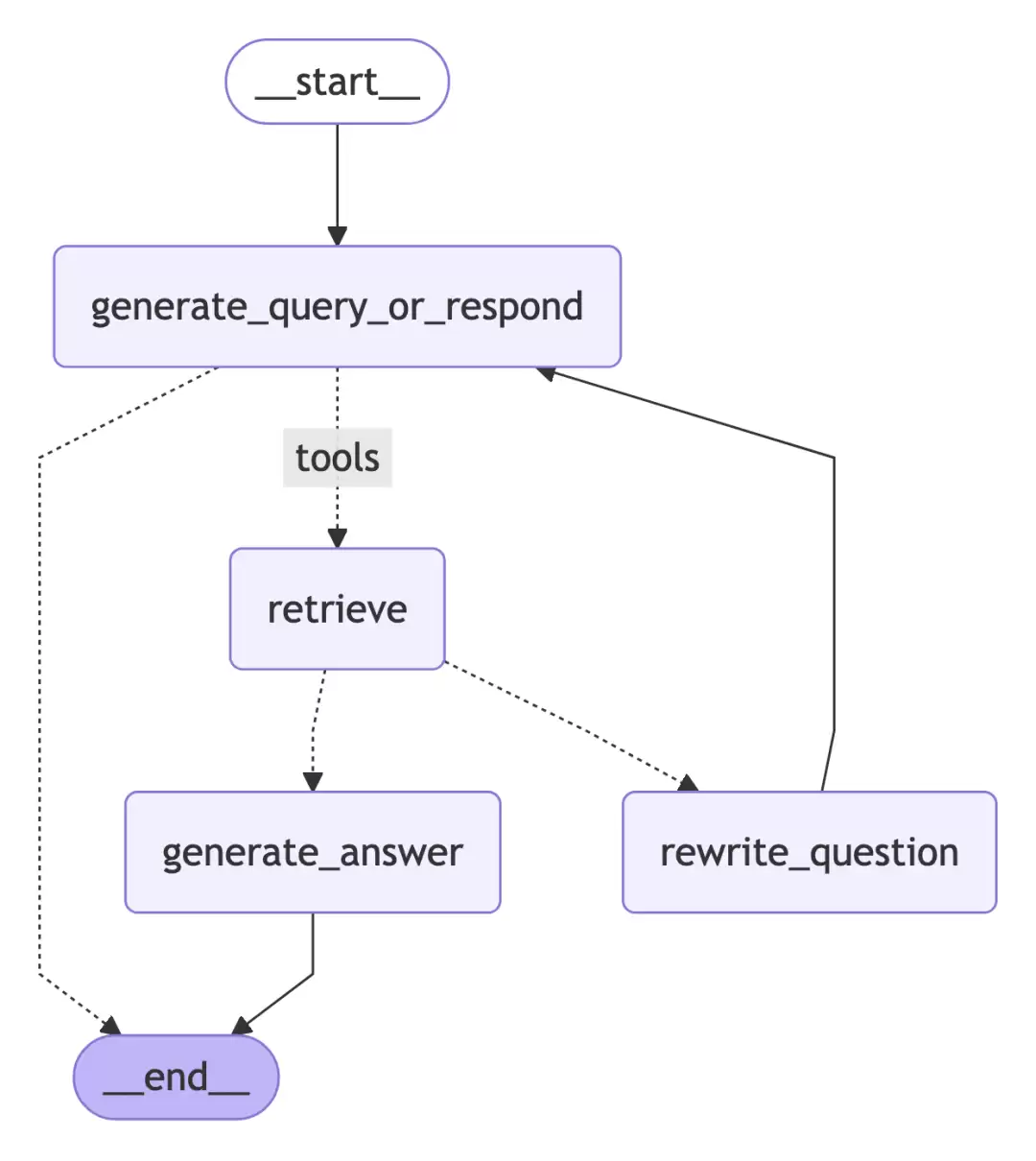
利用 StateGraph 将以上所有节点整合为一个完整且可执行的 RAG Agent 工作流。节点间的条件边清晰定义了执行路径:generate_query_or_respond 之后根据工具调用结果判断是否执行检索;检索完成后依据文档评分决定是直接生成答案还是重写问题;重写问题后再次回到 generate_query_or_respond 形成闭环,直至生成最终答案或流程终止。
from langgraph.graph import StateGraph, START, END
from langgraph.prebuilt import ToolNode
from langgraph.prebuilt import tools_condition

workflow = StateGraph(MessagesState)

# Define the nodes we will cycle between
workflow.add_node(generate_query_or_respond)
workflow.add_node("retrieve", ToolNode([retriever_tool]))
workflow.add_node(rewrite_question)
workflow.add_node(generate_answer)

workflow.add_edge(START, "generate_query_or_respond")

# Decide whether to retrieve
workflow.add_conditional_edges(
    "generate_query_or_respond",
    # Assess LLM decision (call `retriever_tool` tool or respond to the user)
    tools_condition,
    {
        # Translate the condition outputs to nodes in our graph
        "tools": "retrieve",
        END: END,
    },
)

# Edges taken after the `action` node is called.
workflow.add_conditional_edges(
    "retrieve",
    # Assess agent decision
    grade_documents,
)
workflow.add_edge("generate_answer", END)
workflow.add_edge("rewrite_question", "generate_query_or_respond")

# Compile
graph = workflow.compile()
故障排查: 编译 Graph 时若提示“Node not found”,请逐一检查 add_node 中引用的函数名称是否与定义保持一致,尤其注意 rewrite_question 节点需提前完成注册。
下图直观展示了最终 Graph 的可视化结构:
现在,你可以通过调用 graph.invoke({"messages": [{"role": "user", "content": "你的问题"}]}) 来与自建的 RAG Agent 实时交互。
高频问题与解决方案汇总
- Q: 模型为何无法准确调用检索工具?
A: 请确认所使用的 LLM 支持工具调用(例如 Qwen-Plus、GPT-4 等),且bind_tools已正确配置。同时检查工具名称与描述是否清晰明确。 - Q: 文档评分总是返回 “yes” 或 “no”,但准确度不理想?
A: 建议优化GRADE_PROMPT,在其中加入更具体的评分规则与示例。必要时可换用性能更强的评分模型。 - Q: 重写问题后陷入无限循环如何解决?
A: 可在rewrite_question节点内增设循环次数计数器,达到上限后强制跳转至generate_answer或直接结束流程。 - Q: 如何实现向量数据库的持久化存储?
A: 本教程采用InMemoryVectorStore仅作演示用途。生产环境推荐使用Chroma、FAISS等支持持久化的向量数据库方案。
通过以上完整步骤,你已经掌握了使用 LangGraph 构建具备检索、评分、重写与生成能力的 RAG Agent 的核心方法。未来还可进一步扩展节点功能,例如接入多个检索工具、增加多轮对话管理等高级特性,让你的 Agent 更加智能与强大。
你是一名 AI 行业编辑,请围绕下面这条热点输出一份资讯解读:
热点:LangGraph构建RAG智能体从入门到精通手把手实战教程要求:
1. 先用一句话解释这条热点在讲什么
2. 再总结它为什么重要
3. 说明会影响哪些 AI 产品或内容方向
4. 最后给出 3 个适合资讯站使用的标题
游乐网为非赢利性网站,所展示的游戏/软件/文章内容均来自于互联网或第三方用户上传分享,版权归原作者所有,本站不承担相应法律责任。如您发现有涉嫌抄袭侵权的内容,请联系youleyoucom@outlook.com。
 相关热点
相关热点沙发管家是一款老牌安卓电视应用市场,提供应用管理、内存优化、垃圾清理、视频加速等功能,兼容小米、乐视等主流品牌及安卓4 0以上设备,支持远程安装和智能家居控制,资源丰富,操作便捷。
FreeGen是一款永久免费、无需注册、无限制生成的AI绘画工具,支持高定制化输出、提示词逆向生成与细化、多语言界面及智能分类筛选,社区互动便利,提供高效响应,让用户轻松创作高质量图像。
阿里云推出灵动人像LivePortrait,输入照片与文本或音频即可生成数字人视频。其核心为运动与生成模块,具备高精度口型同步与眼神主动控制技术,支持多模型选择,可应用于直播、教育、营销等场景。
QRBTF是一款AI二维码生成工具,适用于个人名片、商业包装、教育课件等场景,支持URL、文本、邮件、电话等编码类型。其核心亮点是快速高效生成个性化二维码,用户可定制外观与功能,并直接下载或分享。
- 日榜
- 周榜
- 月榜
热点快看