
在 jQuery EasyUI 项目中,DataGrid 常用于展示数据库数据并支持分页。当需要根据用户输入动态过滤结果时,可通过工具栏收集参数、调用 load 方法刷新数据,并在服务端执行条件查询。本文将完整演示前后端实现步骤,并指出关键安全与兼容性注意事项。
创建带工具栏的 DataGrid
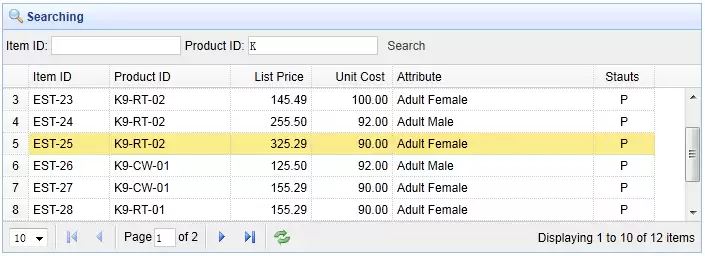
首先初始化一个支持分页的 DataGrid,并通过 toolbar 属性绑定外部工具栏容器。表格列定义包含 Item ID、Product ID、List Price、Unit Cost、Attribute 和 Status 字段,数据源指向 datagrid24_getdata.php。
            Item ID
            Product ID
            List Price
            Unit Cost
            Attribute
            Stauts
工具栏包含两个输入框和一个查询按钮,用于接收用户输入的 Item ID 和 Product ID 关键词。
    Item ID:

    Product ID:

    Search
编写前端查询逻辑
当用户点击 Search 按钮时,触发 doSearch 函数。该函数通过 jQuery 获取输入框的值,并调用 DataGrid 的 load 方法重新请求数据。load 方法会将传入的对象作为 POST 参数发送至 url 指定的接口。
function doSearch(){
    $('#tt').datagrid('load',{
        itemid: $('#itemid').val(),
        productid: $('#productid').val()
    });
}
此机制确保每次查询都会重置分页至第一页,并携带最新的过滤条件。若需保留当前页码或添加额外参数,可在对象中追加对应键值。
服务端查询与分页实现
服务端接收 page、rows、itemid 和 productid 四个参数,构建 LIKE 条件进行模糊匹配,并返回符合 EasyUI DataGrid 要求的 JSON 结构(包含 total 和 rows 字段)。
include 'conn.php';

$page = isset($_POST['page']) ? intval($_POST['page']) : 1;
$rows = isset($_POST['rows']) ? intval($_POST['rows']) : 10;
$itemid = isset($_POST['itemid']) ? mysql_real_escape_string($_POST['itemid']) : '';
$productid = isset($_POST['productid']) ? mysql_real_escape_string($_POST['productid']) : '';

$offset = ($page-1)*$rows;

$result = array();

$where = "itemid like '$itemid%' and productid like '$productid%'";
$rs = mysql_query("select count(*) from item where " . $where);
$row = mysql_fetch_row($rs);
$result["total"] = $row[0];

$rs = mysql_query("select * from item where " . $where . " limit $offset,$rows");

$items = array();
while($row = mysql_fetch_object($rs)){
    array_push($items, $row);
}
$result["rows"] = $items;

echo json_encode($result);
代码首先计算偏移量 offset,随后执行两次查询:一次获取总记录数用于分页控件渲染,另一次获取当前页数据。最终通过 json_encode 输出标准格式,供前端自动解析并刷新表格。
安全与兼容性优化建议
原始示例使用了已废弃的 mysql_* 函数族。自 PHP 5.5 起该扩展已被移除,建议迁移至 PDO 或 MySQLi,并采用预处理语句防止 SQL 注入。例如使用 PDO 时,可将查询改写为:
$stmt = $pdo->prepare("SELECT * FROM item WHERE itemid LIKE :itemid AND productid LIKE :productid LIMIT :offset, :rows");
$stmt->execute([
    ':itemid' => $itemid . '%',
    ':productid' => $productid . '%',
    ':offset' => $offset,
    ':rows' => $rows
]);
同时,建议对输入参数进行类型校验与长度限制,避免异常数据导致查询失败或性能下降。在生产环境中,还应记录查询日志并监控慢查询,确保 DataGrid 在高并发场景下的稳定性。